
.png)


(313 reviews)
Master AI Automation & Build AI Agents (No Code)
৳7,800
ব্যাচ শুরু
Saturday 31 October
31 October
Live Class
10:00 PM- 11:30 PM (Sunday,Tuesday)
সাপোর্ট ক্লাস


Watch Demo class

Personal
একসাথে (Group)
৳7,800

ব্যাচ শুরু হতে সময় বাকি - 0d :0h :0m :0s
এই কোর্সে আপনি পাচ্ছেন:

১৭ সপ্তাহের স্ট্রাকচার্ড স্টাডি প্ল্যান
৩৪ টি লাইভ ক্লাস
API ইন্টিগ্রেশন এবং AI অটোমেশন ওয়ার্কফ্লো তৈরি
AI-চালিত ডেটা বিশ্লেষণ, মার্কেট রিসার্চ এবং বিজনেস অটোমেশন কৌশল
AI ব্যবহার করে সোশ্যাল মিডিয়া কনটেন্ট, ইমেজ, ভিডিও এবং মার্কেটিং ক্যাম্পেইন তৈরি
ফ্রিল্যান্সিং, রিমোট জব ও AI এজেন্ট ডেভেলপার হিসেবে ক্যারিয়ার গাইডলাইন
No-Code AI টুলস ( n8n, OpenClaw, Claude CoWork ) ব্যবহার করে এজেন্ট তৈরি
৪ টি ফ্রিল্যান্সিং এবং জব মার্কেট প্রিপারেশন ক্লাস
উইকলি সাপোর্ট ক্লাস ৩ দিন
এক্সক্লুসিভ জব প্লেসমেন্ট সাপোর্ট
কোর্স সম্পর্কে:
AI এখন আর "ভবিষ্যতের প্রযুক্তি" না - এটা এখনই আপনার ব্যবসা, কাজ, আর ক্যারিয়ার বদলে দেওয়ার বাস্তব হাতিয়ার।
প্রশ্ন একটাই: কোডিং না জেনে আপনি কি এই বিপ্লবে যোগ দিতে পারবেন?
উত্তর: হ্যাঁ, পারবেন। এবং সেটাই আমরা শেখাবো।
"Master AI Automation & Build AI Agents (No Code)" কোর্সে আপনি একদম শূন্য থেকে শুরু করে এমন AI এজেন্ট বানাতে শিখবেন - যেগুলো আপনার হয়ে ইমেইল লিখবে, কাস্টমার সামলাবে, ডেটা অ্যানালাইসিস করবে, রিপোর্ট বানাবে, এমনকি WhatsApp বা Telegram এ ম্যাসেজ পাঠালেই কাজ করে দিবে।
কোডিং নেই। জটিলতা নেই। শুধু রেজাল্ট আছে।
যে টুলগুলো হাতে-কলমে শেখাবো
থিওরি পড়ে সময় নষ্ট না - প্রতিটা ক্লাসে বিশ্বের সবচেয়ে শক্তিশালী AI টুল ব্যবহার করে আপনি নিজে কিছু না কিছু বানাবেন:
Claude - বিশ্বের অন্যতম advanced AI assistant দিয়ে রিসার্চ, রাইটিং, ডেটা অ্যানালাইসিস, ডিসিশন মেকিং
n8n - ভিজ্যুয়াল ওয়ার্কফ্লো বিল্ডার, যেটা দিয়ে শত শত অ্যাপ ড্র্যাগ-অ্যান্ড-ড্রপ করে কানেক্ট করা যায়
OpenClaw - ২০২৬ এর viral open-source AI agent। আপনার নিজের মেশিনে চলবে, WhatsApp/Telegram/Slack/Discord এর মতো messaging app থেকেই কন্ট্রোল করতে পারবেন। ফোনে বসে চা খেতে খেতে AI দিয়ে কাজ সারানোর যুগ শুরু
Claude Code - Claude Code দিয়ে ভিডিও এডিটিং
এই লাইভ ব্যাচে যা থাকছে:
- শুরু হবে AI Agents-এর ফান্ডামেন্টালস থেকে - API Integration, REST Webhooks এবং LLM (GPT, Claude, Gemini, Llama) পরিচিতি। এরপর Prompt Engineering, RAG System, Vector Database এবং Memory Management শেখানো হবে।
- অটোমেশন টুল হিসেবে N8N দিয়ে Workflow তৈরি, AI Node ইন্টিগ্রেশন, Sub-workflow এবং Error Handling সবই হাতে-কলমে শেখানো হবে। পাশাপাশি Make.com -এর মতো অল্টারনেটিভ প্ল্যাটফর্মও কভার করা হবে।
- Advanced অংশে থাকছে Openclaw - যেখানে শেখানো হবে Advanced Tool Calling, Context Engineering, Multi-Agent System Design এবং হাতে-কলমে তৈরি করা হবে একটি পূর্ণাঙ্গ AI Customer Support Agent।
- প্রজেক্ট অংশে থাকছে ১১টি রিয়েল-ওয়ার্ল্ড প্রজেক্ট - Customer Support Agent (Email + Chatbot), Personal Assistant with MCP, Social Media Content Automation, Multi-Step Approval Workflow, Lead Generation এবং Cold Email Outreach।
- কোর্স শেষে থাকছে Capstone Project -Omnichannel Data Capture, AI-Powered Lead Qualification, CRM Automation এবং Webhook ও API Mastery একসাথে একটি Full-Scale AI Agent তৈরির সুযোগ।
- Production Deployment অংশে শেখানো হবে Security, Monitoring, Scaling এবং AI Ethics-সহ রিয়েল প্রোডাকশনে Agent চালানোর সবকিছু।
- ক্যারিয়ার গাইডলাইনে থাকছে Remote Job পাওয়ার স্ট্র্যাটেজি, AI-focused CV তৈরি, LinkedIn অপটিমাইজেশন এবং Upwork-সহ বিভিন্ন ফ্রিল্যান্সিং প্ল্যাটফর্মে সফল হওয়ার A to Z।
জিরো থেকে একজন প্রফেশনাল AI Agent Builder হওয়ার পূর্ণাঙ্গ রোডম্যাপ - সব এক কোর্সে।

Curriculum

কোর্সে আপনি পাচ্ছেন

প্রজেক্টসমূহ

কোর্সটি যাদের জন্য

জব পেয়েছে যারা

রিভিউ

FAQ

পেমেন্ট
Curriculum
কোর্সে আপনি পাচ্ছেন
প্রজেক্টসমূহ
কোর্সটি যাদের জন্য
জব পেয়েছে যারা
রিভিউ
FAQ
পেমেন্ট
Know Details about AI & ML

AI Agent কী? কী থাকে AI Agent এর ভেতরে? সহজ বাংলায় শিখুন AI Automation

Shourov Barua
Cofounder & COO at Ostad
n8n এ কিভাবে সাইন আপ করবেন? সহজ বাংলায় শিখুন AI Automation
Shourov Barua
Cofounder & COO at Ostad
কোড ছাড়া AI Chatbot বানান n8n দিয়ে | সহজ বাংলায় শিখুন AI Automation
Shourov Barua
Cofounder & COO at Ostad
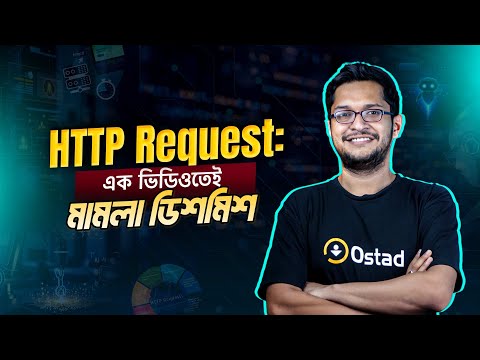
HTTP Request কী? HTTP Request কিভাবে কাজ করে? | সহজ বাংলায় শিখুন AI Automation
Shourov Barua
Cofounder & COO at Ostad
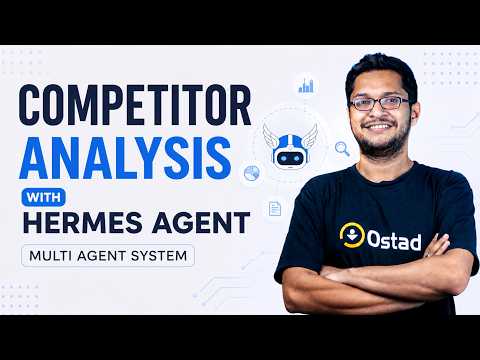
Competitor Analysis with HERMES AGENT
Shourov Barua
Cofounder & COO at Ostad
লাইভ ডেমো ক্লাস
কোর্সে জয়েনের আগে লাইভ ডেমো ক্লাস করে নিন।
চলেন বানাই যেকোন বিজনেসের জন্য ইমেইল এজেন্ট
24 October
09:00 PM


১৫৬০ জন লাইভ ডেমো ক্লাসটি বুক করেছেন।
১৫৬০ জন লাইভ ডেমো ক্লাসটি বুক করেছেন।

নন কোডারদের জন্য AI Agents
Curriculum
17 Module
34 Live Class
Foundations (Module 1-3)
Teacher:

Shourov Barua
Week
1
AI Agent Foundations & First Builds


2 live class

1 Quiz

1 Assignment
Live Class 1: What Are AI Agents? Meet n8n & Build Your First Chatbot
Topic: AI Agent vs traditional chatbot vs raw LLM — where the real difference lies | Core components of an agent (Model, Tools, Memory, Reasoning loop) | Real-world business use cases and market scope — where the money is | Current limitations and future possibilities | What n8n is and why it dominates no-code/low-code automation | n8n interface tour: workflow, node, trigger, execution log | Setting up and connecting an OpenAI/Claude API key | Hands-on: Build and test your first conversational chatbot
Live Class 2: Build an Email-Based Customer Support Agent — From Theory to Live Delivery
Topic: Business value of support automation and why freelancers get paid for it | Setting up the Gmail/email trigger node and OAuth connection | Reading incoming emails and classifying intent | Designing a system prompt to lock in brand voice | Generating auto-reply drafts with human-in-the-loop approval | Edge-case handling: spam, irrelevant, and angry customers | Hands-on: Build a full support agent and debug common errors
Week
3
Data Fundamentals & Transformation
2 live class
1 Quiz
1 Assignment
Live Class 1: The Ins & Outs of JSON, Arrays, Objects, Strings, Numbers & Booleans
Topic: JSON syntax: key-value pairs, objects {}, arrays [] | Data types: string, number, boolean, null | Reading nested objects and arrays of objects | Accessing nested data with JSON path / dot notation | Mastering the n8n expression editor ({{ }}) | Common JSON mistakes and fixing data-format mismatches | Hands-on: Extract specific data from any API response
Live Class 2: Data Transformation in n8n — Mastering the Set Node & Code Node
Topic: Why data transformation is needed (fixing input-output mismatches) | Creating, renaming, and restructuring fields with the Set node | Item, list, and item-linking concepts | Custom logic in the Code node using JavaScript | Loop, filter, and map operations | Merging, splitting, and aggregating data | Hands-on: Clean messy API data into a usable format
Week
2
APIs & Webhooks
2 live class
1 Quiz
1 Assignment
Live Class 1: The Ins & Outs of APIs — Build a Weather Agent with the HTTP Request Node
Topic: What an API really is and why every agent depends on it | REST API basics: endpoint, method (GET/POST/PUT/DELETE), header, body | Authentication methods: API key, Bearer token, OAuth — and when to use which | How to read and test API documentation (using real docs) | The n8n HTTP Request node in depth | Understanding and handling rate limiting, timeouts, and status codes (200/400/401/429/500) | Hands-on: Build a Weather Agent by calling a weather API
Live Class 2: Webhooks from A to Z — Build a Historian Agent with Real-Time Triggers
Topic: What a webhook is and how polling differs from webhooks | Why webhooks are the backbone of real-time automation | Setting up the webhook node in n8n (test vs production URL) | Reading and parsing incoming payloads | Webhook security: signature verification and secret tokens | Triggering a webhook from an external app, form, or curl | Hands-on: Build a Historian Agent that returns information on request, plus webhook debugging (404s, wrong payloads)
Building Production Agents (Module 4-7)
Teacher:
Shourov Barua
Week
4
Web Scraping & Lead Generation
2 live class
1 Quiz
1 Assignment
Live Class 1: Web Scraping with Apify — Where There's Data, There's Opportunity
Topic: What web scraping is, plus its legal and ethical limits | Apify platform overview and the actor concept | Using ready-made actors (Google Maps, LinkedIn, any website) | Bringing scraped data into n8n | Handling pagination, rate limits, and anti-bot measures | Cleaning and structuring data | Hands-on: Scrape structured data from a real target
Live Class 2: Build a Lead Generation Agent with Meta Graph API
Topic: The lead-gen business model and why it's in high freelancing demand | Defining your target (ICP — Ideal Customer Profile) | Scraping leads with Apify (name, email, company) | Email verification and enrichment | Auto-pushing to Google Sheets / Airtable / CRM | Duplicate removal and data quality | Hands-on: Deliver an end-to-end lead generation agent
Week
6
RAG & Vector Databases
2 live class
1 Quiz
1 Assignment
Live Class 1: The Ins & Outs of RAG — Why Agents Need Their Own "Memory"
Topic: LLM knowledge limitations and the hallucination problem | What RAG (Retrieval Augmented Generation) actually is | What embeddings and vectors are, and how they work | Chunking strategy (size, overlap) | Vector database concepts and similarity search | The RAG pipeline: ingest → embed → store → retrieve → generate | When you need RAG and when you don't
Live Class 2: Build a RAG-Based Customer Support Agent with a Supabase Vector Database
Topic: Setting up Supabase and enabling pgvector | Preparing the knowledge base (docs, FAQ, PDF) | Ingesting documents and storing embeddings | Building the retrieval pipeline in n8n | Generating accurate answers from retrieved context | Source citation and accuracy verification | Hands-on: A support agent running on the company's own data
Week
5
MCP & Advanced Agents
2 live class
1 Quiz
1 Assignment
Live Class 1: MCP (Model Context Protocol) & Its Practical Usage
Topic: What MCP is and why it's called "USB-C for AI" | MCP server vs client architecture | How to connect an MCP server | Popular MCP servers (filesystem, GitHub, database) | MCP integration in n8n / Claude | The concept of exposing your own tool via MCP | Hands-on: Connect and use a real tool through MCP
Live Class 2: Build an AI Receptionist — A Smart Agent That Handles Calls & Chats
Topic: Receptionist agent use cases (clinic, salon, agency) and business scope | Multi-intent handling (booking, FAQ, routing) | Checking appointments via calendar integration | Holding conversation context with memory | Designing fallback and human handoff | Hands-on: Build and test a full AI receptionist
Week
7
make.com Automation
2 live class
1 Quiz
1 Assignment
Live Class 1: Build a Meeting Scheduler Agent with make.com
Topic: make.com vs n8n — when to choose which | The make.com interface: scenario, module, route | Google Calendar integration | Checking availability and suggesting slots | Sending email/notification confirmations | Multi-step scenarios and error handlers | Hands-on: Build a full meeting scheduler agent
Live Class 2: Social Media Automation with make.com
Topic: The business scope of content automation | Multi-platform posting (Facebook, Instagram, LinkedIn, X) | Generating captions and content with AI | Handling images and media | Scheduling and queue management | Pulling analytics data | Hands-on: Build a social media auto-poster
The Claude Power-User Track (Module 8-10)
Teacher:
Shourov Barua
Week
8
Claude for Automation & Client Work
2 live class
1 Quiz
1 Assignment
Live Class 1: Automation with Claude & Context Engineering
Topic: How automation with Claude differs from n8n | What context engineering is and why it's bigger than prompt engineering | Effective context: instruction, example, constraint, format | Context window management and cost control | System prompt vs user prompt design | Building reusable prompt templates | Hands-on: Complete a real automation task with Claude
Live Class 2: Claude Projects — Handling a Real Client's Task End to End
Topic: What Claude Projects are and when to use them | Setting up project knowledge and custom instructions | Simulating a real client scenario | Uploading documents, context, and brand voice | Iterative work and version handling | Building and handing over a client deliverable | Hands-on: A project-based client task from A to Z
Week
10
Claude MCP & Claude Code
2 live class
1 Quiz
1 Assignment
Live Class 1: Claude MCP with Excel, Figma & Mixpanel for Design & Analysis
Topic: Connecting external tools via MCP (recap) | Analyzing Excel/Sheets data with Claude | Using design context by connecting Figma | Reading product analytics by connecting Mixpanel | The data → insight → action workflow | Hands-on: Extract business insight from data
Live Class 2: Claude Code + Playwright — Build a Lead Generation Agent
Topic: What Claude Code is and how to install and set it up | Understanding terminal-based agentic coding | Browser automation with Playwright | Scraping leads from the web (login, navigate, extract) | Code structure and debugging | Hands-on: Build a code-based lead generation agent
Week
9
Claude Skills & Connectors
2 live class
1 Quiz
1 Assignment
Live Class 1: Claude Skills — Building Reusable Capabilities
Topic: What Claude Skills are and how they work | Skill structure (SKILL.md, instructions, resources) | When to build a skill vs just prompt | Creating your own custom skill | Testing and iterating on a skill | Sharing and reusing skills across a team | Hands-on: Build a practical skill
Live Class 2: Claude Connectors — Turning Claude into Your Personal Assistant
Topic: What Connectors are and how they relate to MCP | Connecting Gmail, Calendar, and Drive | Doing real tasks with connected tools | Privacy, permission, and security considerations | Automating your daily workflow | Hands-on: Set up your own personal assistant
কোর্সটি আপনারই জন্য

Instructor

Shourov Barua
Cofounder & COO at Ostad | AI Automation & AI Agent Specialist
.png)

Sunzil Khandaker
Researcher | Co-founder at AbSun | Computer Vision, AI | Datathon Winner | Seeking MSc/PhD Opportunities


.png)
Abrar Javed Sorafi
Teaching Assistant at Ostad | Jr. Backend Developer | Lead Django Developer - SevvenLabs | Freelance Django Developer | Solving SaaS Scalability & Automation Challenges

.png)
যেসব টুলস ও টেকনোলোজি শিখবেন

n8n(local host)

OpenAI

Anthropic

Hugging Face

Google Gemini

LLaMA

Postman

REST API

JSON

GitHub
.jpeg)
MongoDB

Google Calendar

Google Tasks

Vector DB
ChromaDB

FAISS

Gmail

Zapier
কী কী থাকতে হবে

ল্যাপটপ/ডেস্কটপ (৪ জিবি র্যাম)

ভালো ইন্টারনেট কানেকশন

লেগে থাকার মানসিকতা
কোর্সে আপনি পাচ্ছেন

৪ মাসের স্টাডিপ্ল্যান

৩৪ টি লাইভ ক্লাস

১১ টি স্ট্যান্ডার্ড প্রজেক্ট

প্রোগ্রেস ট্র্যাকিং

সপ্তাহে ৩ দিন সাপোর্ট ক্লাস(ক্লাস হবে রাতে)

কমিউনিটি সাপোর্ট

লাইফটাইম এক্সেস

ইন্টারভিউ হ্যান্ডবুক

সার্টিফিকেট
কোর্স শেষে পাচ্ছেন এক্সক্লুসিভ জব প্লেসমেন্ট সাপোর্ট!

যেসকল রিয়েল লাইফ প্রোজেক্ট করানো হবে
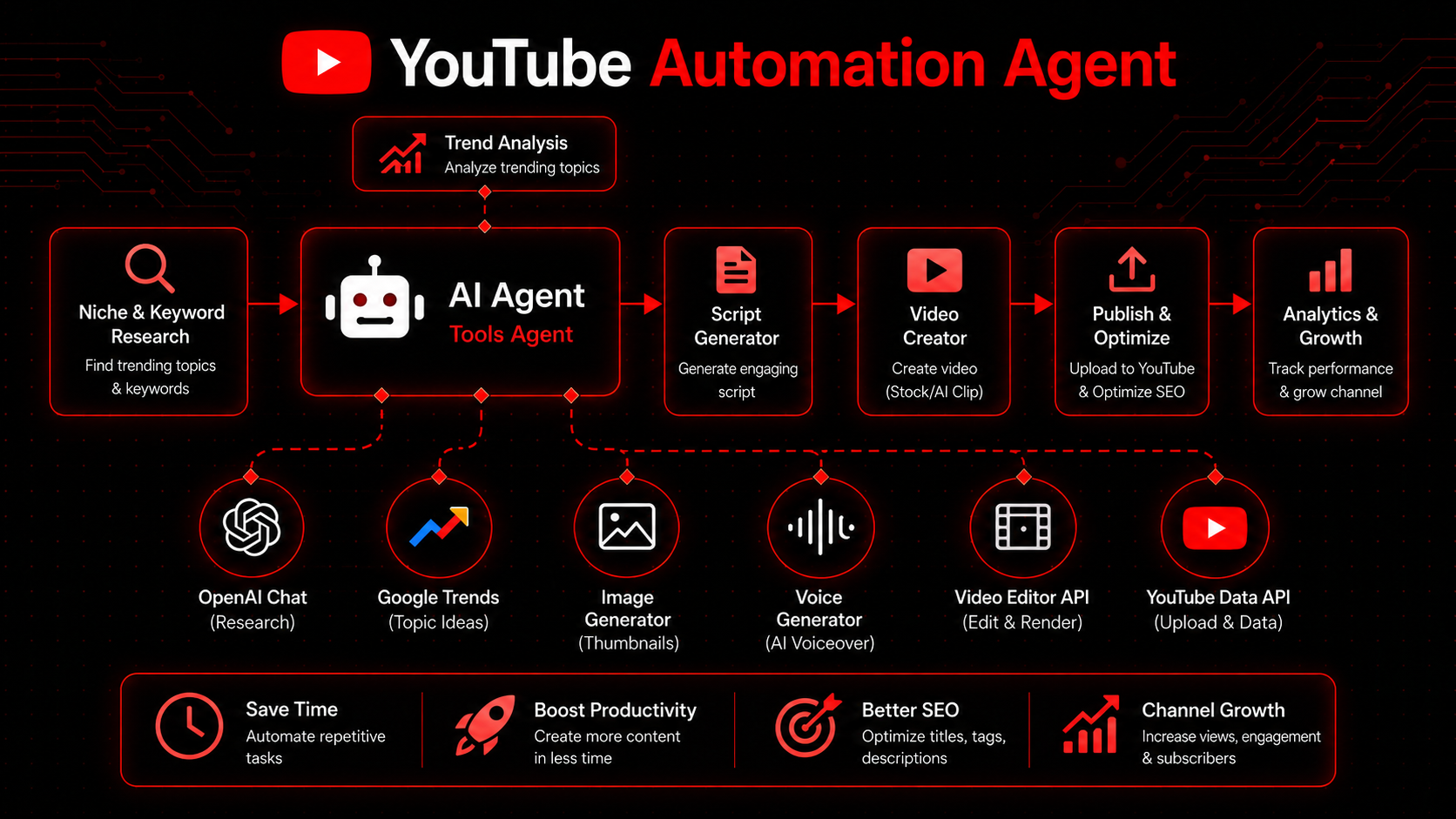

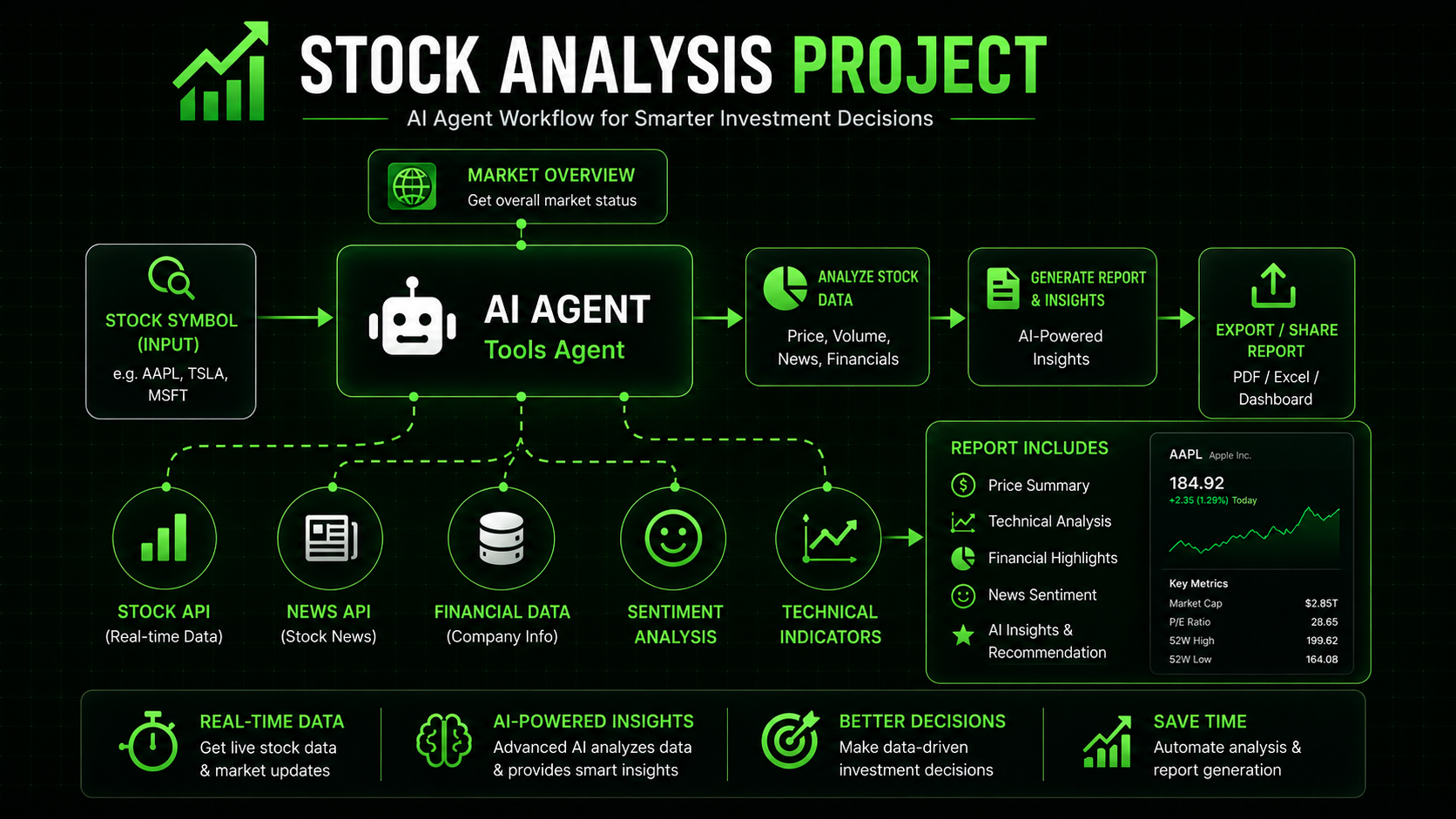
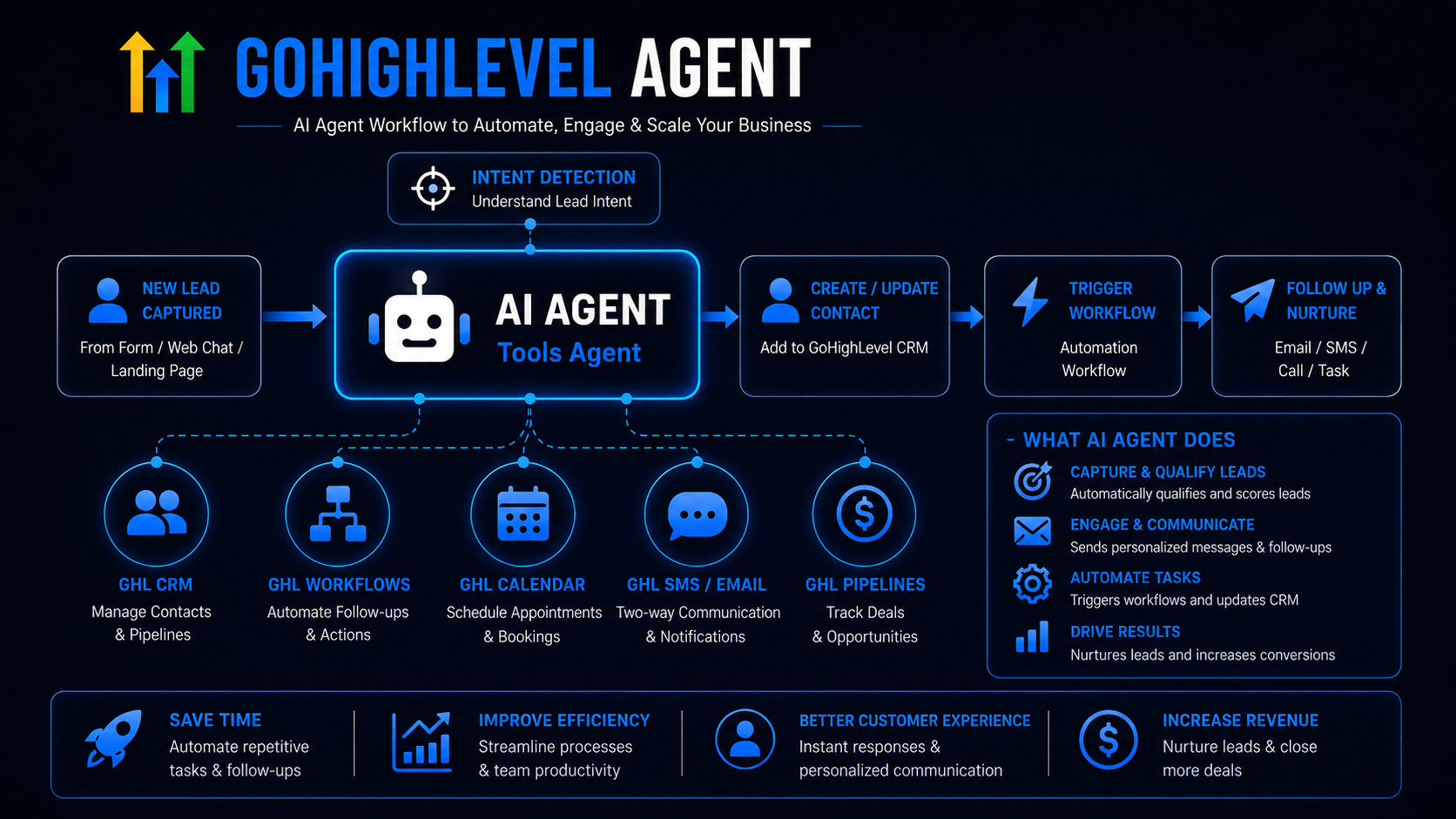
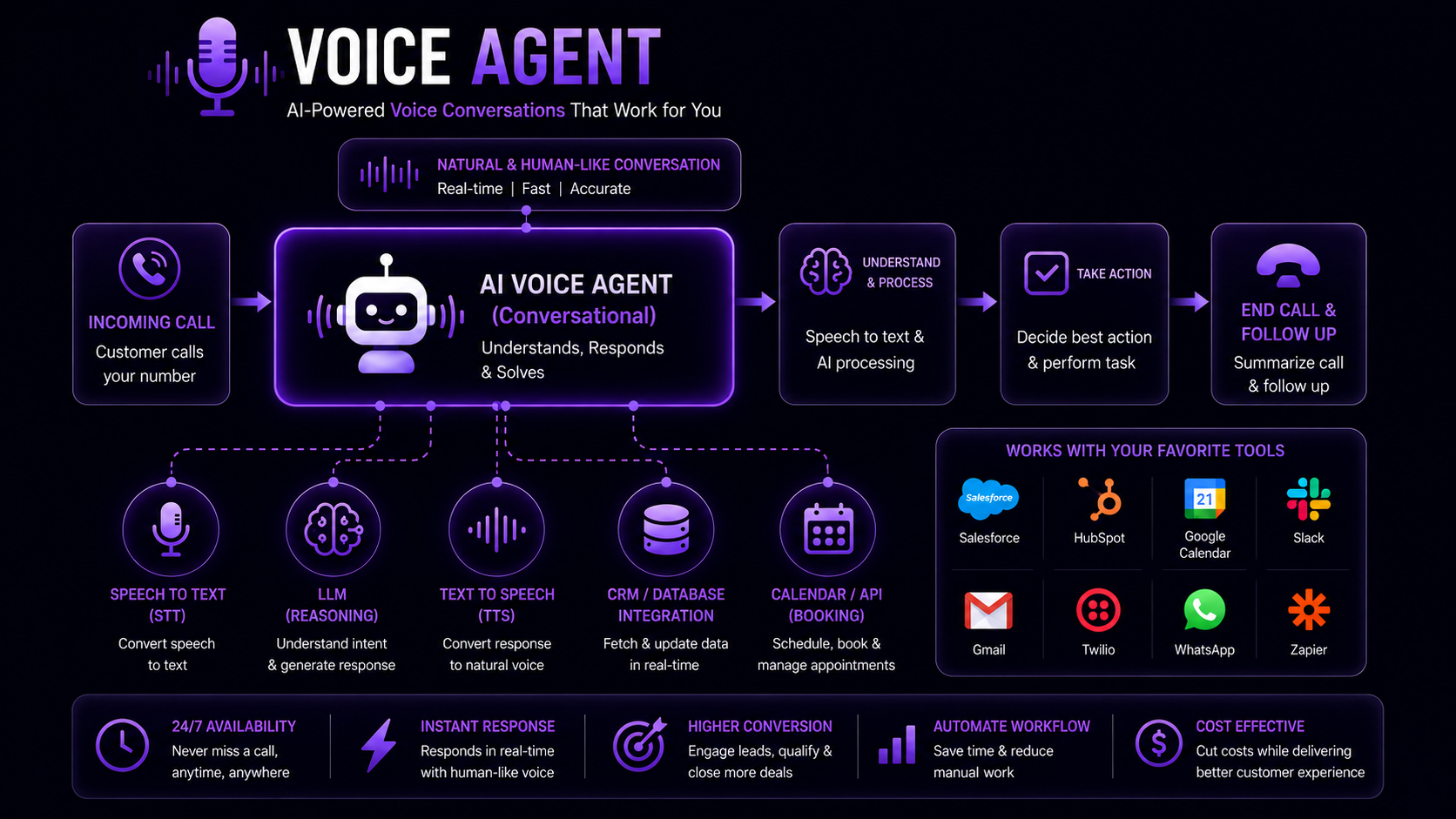
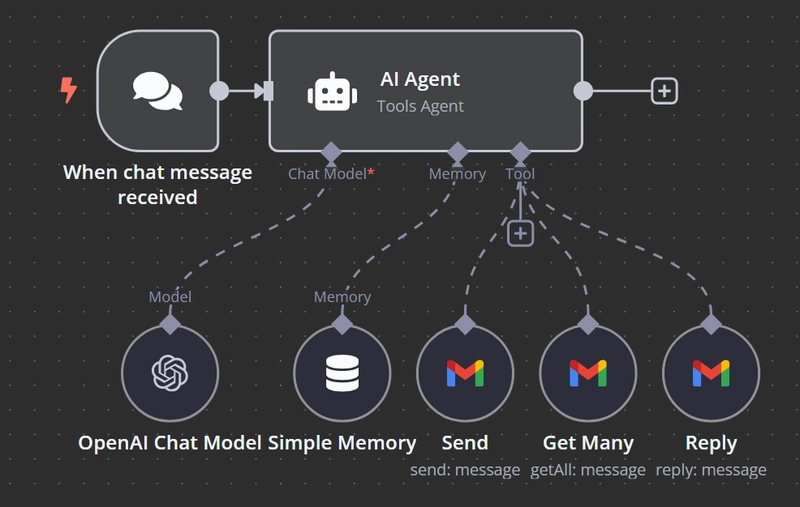
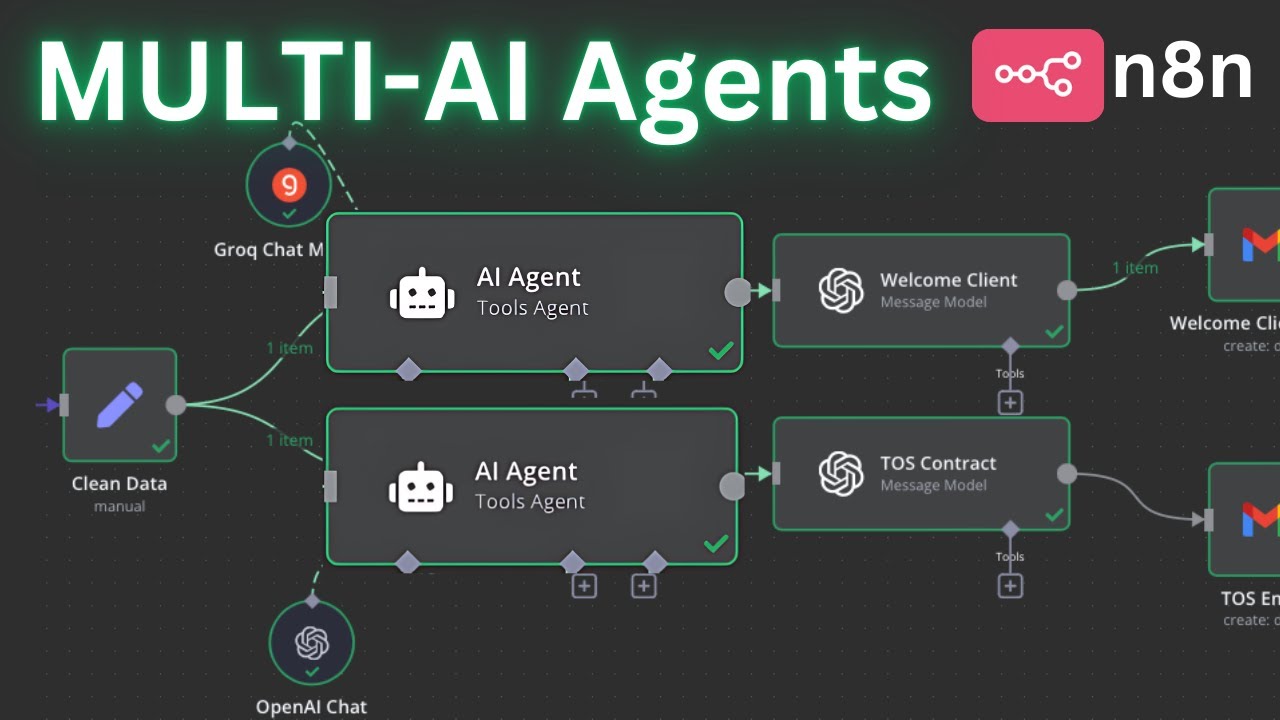
কোর্সটি আপনারই জন্য
সাকসেসফুল হয়েছেন যারা
Feedback
Hear From Our Learner
Excellent Course Instructors, knowledgeable and supportive.
MM
Md. Mominul Islam (ব্যাচ ১১)

I asked about n8n security regarding sharing my info, and the Course Instructors answered me with a good response.
AC
Arman Chowdhury (ব্যাচ ১১)
Really very informative Course Instructors, I have never met such before.
AZ
Ahmed Zahir (ব্যাচ ১১)
This strictness is required to maintain discipline in the course. Like the idea of giving assignments.
KZ
Kamruz Zaman (ব্যাচ ১০)
Supportive, focused, to the point.
MS
Mohammad Shohug (ব্যাচ ১০)
Excellent Course Instructors! The explanations are always clear, simple, and easy to understand. I truly appreciate the dedication and support. Thank you for making learning enjoyable!
MA
Md Abrar Hossain Nishat (ব্যাচ ১০)
Best Course Instructors - polite, humble, honest.
MN
Md. Nadim Mir (ব্যাচ ৯)
এই কোর্সের বিষয়গুলো আমার জন্য নতুন, এবং বিষয়গুলো বোঝা খুব দরকার ছিল। Course Instructors ভালো শিক্ষক। কোর্সটা খুব মজার ছিল এবং আমার মনে হয় সবার মজা লেগেছে। ধন্যবাদ Course Instructors।
MM
Md. Mustafizur Rohman (ব্যাচ ৯)
বর্তমান সময়ে AI শেখার জন্য অনেক কোর্স থাকলেও Ostad-এর AI Automation কোর্সটি আমার কাছে ব্যতিক্রমী মনে হয়েছে। Course Instructors-দের গভীর জ্ঞান, বাস্তব অভিজ্ঞতা এবং সহজভাবে উপস্থাপনের দক্ষতা সত্যিই প্রশংসনীয়। প্রতিটি সেশনে নতুন কিছু শেখার সুযোগ পাচ্ছি এবং আত্মবিশ্বাসও বাড়ছে। Ostad প্ল্যাটফর্ম ও সম্মানিত Course Instructors-দের প্রতি আন্তরিক কৃতজ্ঞতা ও শুভকামনা রইলো।
GM
GM Mazharul Islam (ব্যাচ ৮)
মোটিভেশনটা জোস ছিল, অনেক সাপোর্ট ছিল।
T
Tonmoy (ব্যাচ ৭)
I just want to take a moment to appreciate the Course Instructors. Their guidance, support, and the way they share their knowledge have truly made a big difference in my journey. I've learned so much from them, and their mentorship continues to inspire me to improve every day. Grateful to have them as my mentors.
LA
Likhon Acharjya (ব্যাচ ৭)
The Course Instructors explained everything clearly and made the course easy to understand. They were very supportive and approachable. Overall, it was a great learning experience.
MH
Mustain Hosain (ব্যাচ ১১)
The Course Instructors are very good lecturers and have great teaching skills. I wish them all the best for their future.
MM
Md Mamunur Rashid Toha (ব্যাচ ১১)
The Course Instructors are good at presenting demos with real-world examples, and students can capture things easily with their examples. So overall good for me.
UH
Umme Habiba (ব্যাচ ১০)
The Course Instructors seem to be very hardworking, which is inspiring, and the way they teach and explain is truly understandable and indicates that they are experienced.
MS
Musfiqush Salam (ব্যাচ ৯)
The Course Instructors were knowledgeable, supportive, and explained the topics clearly. Overall, the sessions were very informative and helpful.
AH
Abdul Hadi Chowdhury (ব্যাচ ৯)
The Course Instructors' teaching style is excellent. They explain everything in a simple and straightforward manner, which will be very helpful for our learning. I hope I will be able to learn many things from this course.
AM
Abu Mohammad Khairul Bashar (ব্যাচ ৮)
The Course Instructors take very informative, detailed sessions, which is really valuable.
PB
Prithibi Biswas (ব্যাচ ৮)
The Course Instructors were supportive and explained the topics clearly. The course was helpful for understanding AI automation and AI agents. It was a good learning experience.
SM
Syed Miju Ahmed (ব্যাচ ৭)
The Course Instructors explain very well. One thing I like the most is that they never get annoyed when someone asks a question, no matter what the question is. They keep explaining the topic until we understand it, and they explain it in very simple language.
AB
Angkon Biswas (ব্যাচ ৭)
The Course Instructors have a very clear and structured teaching style.
NA
Nure Ahad (ব্যাচ ৭)
Hats off to the Course Instructors. Despite a 103 degree fever, the full session and the last Q/A part went smoothly. They are very supportive and showed all the steps multiple times for better understanding of the students.
SM
S.M. Omar Faruq (ব্যাচ ১১)
আমি আপনাদের তিন নম্বর এবং চার নম্বর ব্যাচেও কোর্স করছিলাম। সেই তুলনায় ১১ নম্বর ব্যাচের কোর্সটা অনেক গোছানো এবং সুন্দর হয়েছে। ইনশাল্লাহ এখান থেকে ভালো কিছু হবে আশা করছি।
AR
Abdur Rahman (ব্যাচ ১১)
Amazing Course Instructors, amazing sense of humor and amazing skills in teaching students. Love the environment.
MA
Md. Al Amin (ব্যাচ ১১)
Very realistic and friendly Course Instructors.
AK
Abul Kashim Nazim (ব্যাচ ১০)
What makes the Course Instructors good is their practical approach. They avoid unrealistic promises and focus on real-world concepts. Honestly, instructors who are a bit strict are exactly what we need.
MU
Md Umaer Alam Sarkar (ব্যাচ ১০)
Helpful and friendly Course Instructors, even the support session instructors respond so well.
SS
Sarifa Siddika (ব্যাচ ১০)
Very good and clear delivery of speech.
SR
Sunnymoon Rafi (ব্যাচ ৯)
Very good Course Instructors. Their teaching method is excellent; they handle the sessions strictly yet in a fun way. Even during a 2 hour 22 minute session, it never felt boring or monotonous.
NJ
Nusrat Jahan (ব্যাচ ৮)
Awesome ability to explain the topics.
AS
Abdullah Salim (ব্যাচ ৮)
It's totally amazing. Thank you Ostad for this nice course initiative.
AA
Avira Akter (ব্যাচ ৭)
Very friendly, positive minded and supportive.
LB
Liton Barua (ব্যাচ ৭)
The Course Instructors were excellent, knowledgeable, and explained everything clearly. I really enjoyed the learning experience.
MA
Monsad Alam (ব্যাচ ১১)
The Course Instructors are very knowledgeable and explain every concept clearly.
MP
Md Parves Hasan Sumon (ব্যাচ ১১)
The Course Instructors are fun and interesting to watch, that's why I don't get bored in the sessions.
RF
Raihan Faruque (ব্যাচ ১০)
Course Instructors খুব সুন্দর ও সহজভাবে প্রতিটি বিষয় বুঝিয়েছেন। তাঁদের পড়ানোর পদ্ধতি আমার খুবই ভালো লেগেছে। কোর্সটি করে আমি অনেক কিছু শিখতে পেরেছি। আন্তরিকভাবে Course Instructors-দের ধন্যবাদ।
MA
Md. Abid Hasan (ব্যাচ ৯)
The Course Instructors explained the RAG concepts very clearly and made the topic easy to understand with practical examples. The sessions were informative, engaging, and very useful for understanding how RAG works in real-world AI applications. Overall, it was an excellent course.
FI
Fakrul Islam (ব্যাচ ৯)
The Course Instructors are very patient with the students and enthusiastic about teaching.
IM
Iffat Mahmudur Rahim Pabon (ব্যাচ ৮)
The Course Instructors are highly knowledgeable and do an excellent job of explaining concepts in a clear and understandable manner. Overall, the Course Instructors demonstrate strong subject matter expertise and a genuine commitment to student success.
SJ
Salman Junaed Islam (ব্যাচ ৮)
The Course Instructors' instructions were very direct and understandable. They explained everything elaborately and gave the opportunity to ask questions whenever it was appropriate. Overall, it was a great interactive course.
ST
Sheemanto Taron (ব্যাচ ৭)
The Course Instructors explained everything clearly and seem knowledgeable.
ZH
Zakir Hossain (ব্যাচ ৭)
The Course Instructors' teaching strategy is awesome and engaging.
BD
Bishal Dey (ব্যাচ ৭)
Thank you! It was such a great course. We really enjoyed it and learned a lot!
HR
Hafizur Rahman (ব্যাচ ১১)
I highly appreciate the devotion of the Course Instructors. Despite being very sick, they continued with the session and made each topic understandable.
S
Sadat (ব্যাচ ১১)
The teaching capability, command during the sessions and dedication of the Course Instructors are outstanding.
RP
Rumy Parvez (ব্যাচ ১১)
I am happy with the way the Course Instructors are teaching me.
MA
Md Arifur Rahman Efty (ব্যাচ ১০)
In my opinion the Course Instructors are very strict, but they teach us very well.
KM
Khalid Mustakim (ব্যাচ ১০)
Excellent, clear voice and presentation.
MJ
Md. Jahangir Alom (ব্যাচ ১০)
This course has great potential for our professional life. Thank you very much to our honourable Course Instructors for their teaching skills and techniques. Thanks to all staff for regular support.
MS
Md Shazzadur Rahman (ব্যাচ ৯)
Explaining concepts - wow, managing 180 people - wow. What I liked: 1st - clear agenda, 2nd - making us understand the concept.
MI
Md Imran Rahman (ব্যাচ ৮)
Excellent, hard working, engaging with the topic.
RA
Russel Ahmed (ব্যাচ ৮)
The course was informative and well conducted.
RA
Rakinul Azim (ব্যাচ ৭)
The first impression of the course was very good and the sessions were also easy and understandable. My Course Instructors are amazing teachers and at the same time funny people, who do not let us get bored.
MN
Md. Nahid Faysal Sujel (ব্যাচ ৭)
Our Course Instructors are very talented, they teach us very calmly. I bought the course after a demo class and realized that they can teach very easily.
MH
Mahmudul Hasan (ব্যাচ ১১)
The Course Instructors were very straightforward and that's a good thing for me.
A
Araf (ব্যাচ ১০)
The Course Instructors are very supportive, approachable, and explain the topics clearly. The sessions are engaging and helpful, and the Course Instructors are always willing to answer questions and provide guidance. Overall, I am satisfied with the Course Instructors' teaching style.
SR
Shamsur Rahman (ব্যাচ ১০)
Course Instructors khub friendly. Khub sundor kore bujhanor try kore.
NA
Nipa Akter (ব্যাচ ৯)
The Course Instructors' way of speaking is really engaging for the listeners.
SM
S. M. Sadman Haque (ব্যাচ ৮)
The Course Instructors are not just reading scripts or creating workflows but also ensuring that everyone is understanding by pausing, re-explaining and taking questions.
FB
Farhab Bin Naser (ব্যাচ ৮)
The Course Instructors were highly knowledgeable, supportive, and explained every topic clearly. The sessions were engaging, and all questions were answered patiently. Thank you for the excellent guidance.
ME
Md. Ekramul Hossain (ব্যাচ ৮)
The Course Instructors demonstrated exceptional knowledge and explained concepts in a clear, engaging manner. Their teaching style made learning enjoyable and easy to understand, even for complex topics. Overall, it was an excellent experience, and their guidance greatly enhanced my understanding.
MS
Md Saiful Alam (ব্যাচ ৭)
Course Instructors bhalo bujhay. Tader bujhanor skill bhalo. Overall course ta bhalo chilo.
HR
Hafizur Rahman Shimanto (ব্যাচ ৭)
The Course Instructors are knowledgeable, friendly, and supportive. They explain concepts clearly, encourage participation, and make the sessions engaging. Overall, it was a great learning experience.
SA
Shorifa Akter (ব্যাচ ৭)
Knowledgeable and supportive Course Instructors.
SH
Sabiha Hasan (ব্যাচ ১১)
I truly appreciate the way our Course Instructors conduct every session with so much care, patience, and dedication. They explain each topic in such a clear and simple way that it becomes much easier for us to understand and apply. Whenever someone does not understand a topic, they patiently explain it again and demonstrate it until we fully understand. What I especially appreciate is their friendly teaching style and the effort they put into making every topic easy and practical for us. Their way of presenting and explaining things makes the learning experience enjoyable and motivating. I am very hopeful that if I can complete this four-month course successfully, I will gain many valuable skills that I can apply to my digital marketing and online activities. I believe these skills will help me automate many of my tasks and work more efficiently. I am genuinely grateful for the opportunity to learn from such supportive Course Instructors, and I am excited to continue this journey and learn much more.
MA
Md Al Amin (ব্যাচ ১১)
Very supportive and motivating Course Instructors.
AT
Ayesha Tasnim Anika (ব্যাচ ১০)
Great teaching style and very clear explanations. I really enjoyed learning from these Course Instructors.
IK
Ibrahim Khalil Mobin (ব্যাচ ১০)
With the Course Instructors' guidance, I think I'll learn more than I expected.
MA
M. Atiqur Rahman Tareq (ব্যাচ ১০)
Very much precise and supportive towards students.
MH
Monirul Hasan Rafi (ব্যাচ ৯)
I have never seen instructors who are as involved with students in online courses as the Course Instructors.
MM
Md. Mostafizur Rahman (ব্যাচ ৯)
I found the automation course very interesting, and overall the Course Instructors' sessions were good. In the future, inshallah, we hope for even better outcomes.
MS
Md. Sarwar Alam (ব্যাচ ৮)
Supportive and inspiring.
SJ
Sabrin Jahan (ব্যাচ ৮)
Highly focused on the topic during the course. Helps me keep the momentum going and learn better. Really clear about explaining the work at hand. Easy to follow. I like them.
N
Nazmul (ব্যাচ ৭)
Goal-oriented and driven, encouraging tough learning through doing.
NR
Nandini Roy (ব্যাচ ৭)
The Course Instructors are very helpful and explain concepts clearly. The sessions are informative, well-organized, and easy to follow. I am enjoying the learning experience and appreciate the Course Instructors' support.
MR
Md Rashedul Islam (ব্যাচ ১১)
The Course Instructors explain concepts clearly and make complex topics easy to understand. They are patient, supportive, and answer questions well. The practical examples and live demonstrations are very helpful.
SH
Showim Hossen Siam (ব্যাচ ১০)
The Course Instructors are very smart in teaching, I think I can learn a lot from them.
MF
Md. Foridul Islam (ব্যাচ ৯)
The Course Instructors are so careful about us. They teach us point by point, and if anyone cannot understand anything, they help them understand it quickly with care and joy.
SS
Sujoy Sarkar (ব্যাচ ৯)
The Course Instructors were very professional, gentle, and supportive throughout the sessions. They explained every topic clearly and in an easy-to-understand way, which made the learning process much smoother and more enjoyable.
KS
Kh. Shapahjolovy Sabbir (ব্যাচ ৮)
Our Course Instructors are very friendly. They teach very well. I am satisfied.
IR
Iftekhar Rahman (ব্যাচ ৮)
The Course Instructors are among the best tutors I have ever had.
SC
Shahul Chowdhury (ব্যাচ ৮)
Course Instructors খুব সুন্দরভাবে বুঝিয়ে পড়িয়েছেন। সবচেয়ে ভালো লেগেছে তাঁরা practical দেখিয়ে বুঝিয়েছেন, যার কারণে বিষয়গুলো সহজে বুঝতে পেরেছি। তাঁদের teaching style খুবই engaging এবং beginner-friendly, তাই শেখার experience অনেক ভালো হয়েছে।
CA
Chandni Akter (ব্যাচ ৭)
The Course Instructors are good. The teaching style is clear.
SA
Saima Akther (ব্যাচ ৭)
The Course Instructors were good throughout the sessions and interacted well.
HH
Hafijul Haider (ব্যাচ ৭)
সার্টিফিকেট
কোর্স শেষে পেয়ে যান শেয়ারেবল কোর্স কমপ্লিশন এবং এসেসমেন্ট সার্টিফিকেট
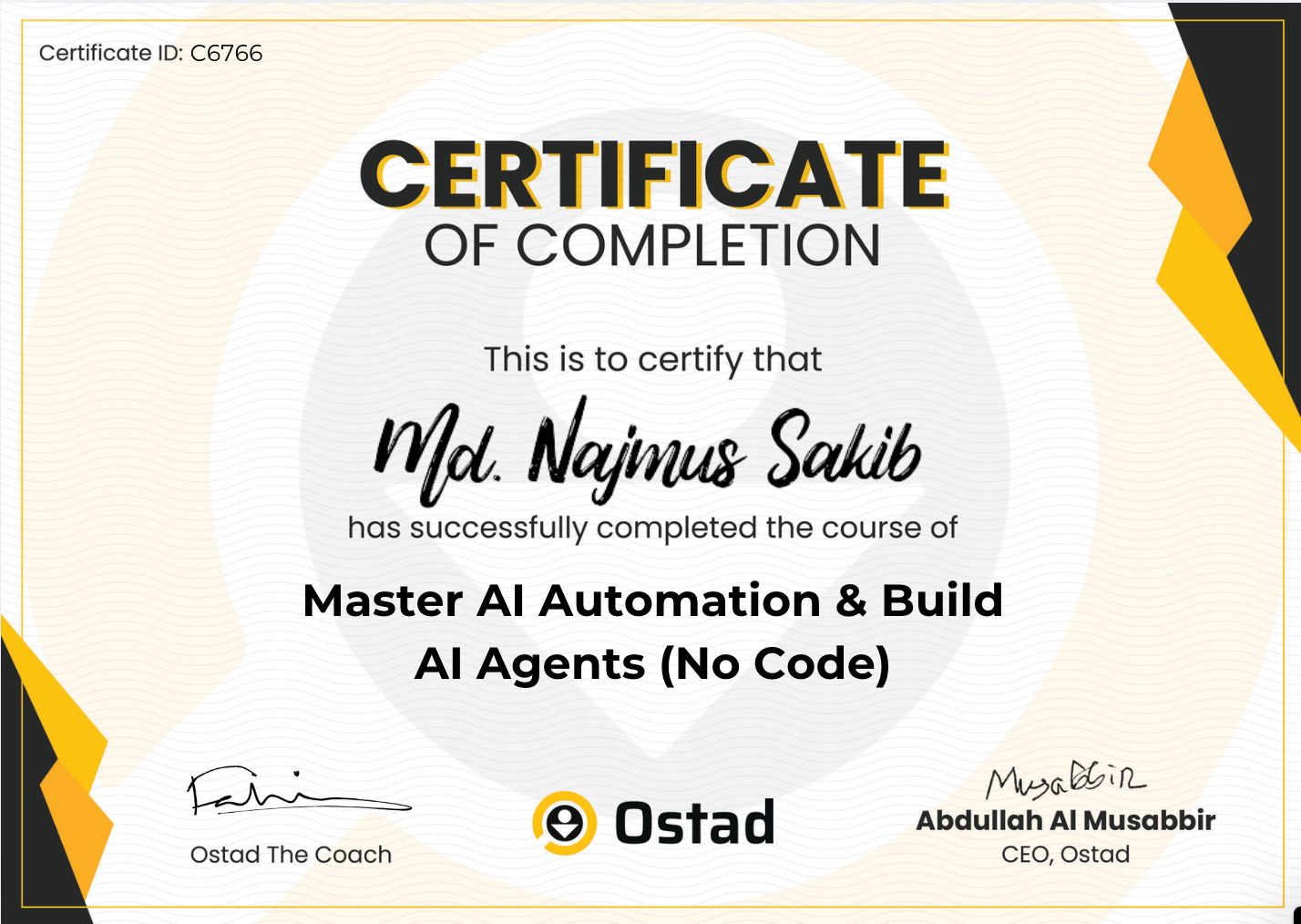
কোর্স কমপ্লিট করে পেয়ে যান শেয়ারেবল কোর্স কমপ্লিশন সার্টিফিকেট
কোর্সে আপনার এসেসমেন্টের রেজাল্টের ওপর পেয়ে যান এসেসমেন্ট সার্টিফিকেট
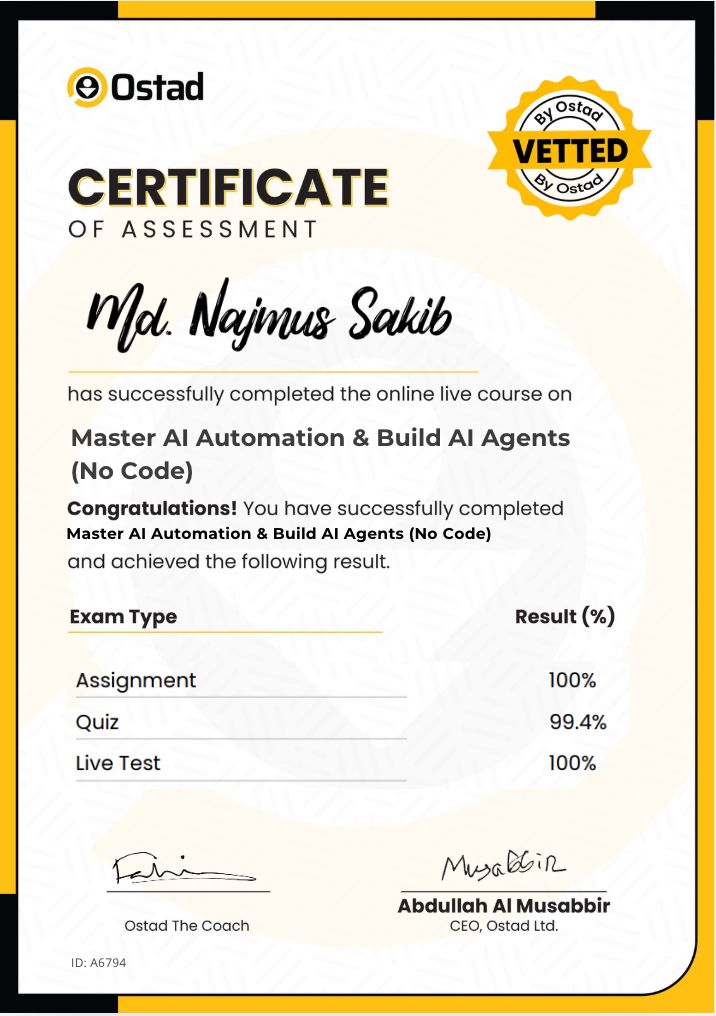
প্রায়ই জিজ্ঞেস করা প্রশ্ন

How to Pay
1. পেমেন্ট মেথড কি কি?
 আপনি সরাসরি ওস্তাদের পেমেন্ট গেইটওয়ের মাধ্যমে Bkash, Nagad, Rocket, Visa, Mastercard, Debit and Credit কার্ড দিয়ে পেমেন্ট করতে পারবেন।
2. আমি কি যেকোনো ডিভাইস দিয়ে পেমেন্ট করতে পারবো?
জ্বী, আপনি ফোন, পিসি কিংবা ল্যাপটপ যেকোনো ডিভাইস দিয়ে পেমেন্ট করতে পারবেন।3. পেমেন্ট প্রসেস কি?
পেমেন্ট করার জন্য প্রথমে ব্যাচে ভর্তি হোন বাটনে ক্লিক করুন। এরপর পেমেন্ট পেইজ থেকে পেমেন্ট মেথড সিলেক্ট করে পেমেন্ট করুন বাটনে ক্লিক করুন এবং পেমেন্ট সম্পন্ন করুন।4. ডিসকাউন্ট কিভাবে পাবো?
আপনি ব্যাচে ভর্তি হওয়ার আগে এভেইলেবল প্রোমো কোড বসিয়ে এক্সপেক্টেড ডিসকাউন্ট পেতে পারেন।5. পেমেন্ট কনফার্মেশন কিভাবে পাবো?
পেমেন্ট প্রসেস শেষ হলে আপনার কাছে একটি মেসেজ আসবে এবং আপনার ড্যাশবোর্ডে আপনার জয়েন করা ব্যাচটি দেখাবে। আপনার স্টাডি প্লান অনুযায়ী কোর্স শুরু করে দিতে পারবেন।6. আমার লেনদেনের হিসাব থাকবে কি?
আপনার ড্যাশবোর্ডে আপনি প্রোফাইল থেকে ট্রাঞ্জেকশন ট্যাবে ক্লিক করে লেনদেন দেখতে পারবেন।
Join our Facebook group

2700 Members
AI Automation & Build AI Agents No Code
Talk to Career Counselor

*সকাল ১০ টা থেকে রাত ১০টা পর্যন্ত
Promo Code UTSHOB 40% Discount, 7 Days Left!